 VPNomad
Steps to change the SID
1. Open the Amigo VPN application and click on the menu icon 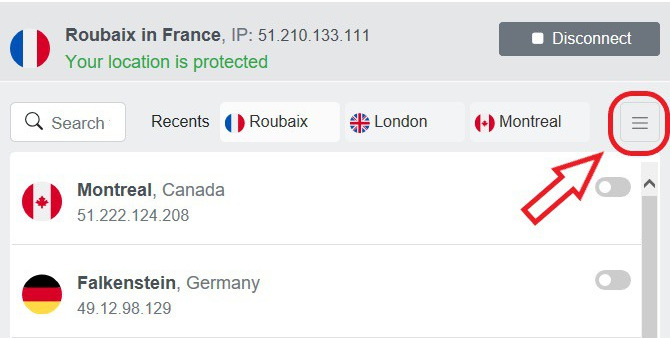
2. Click on the "Change Service ID" icon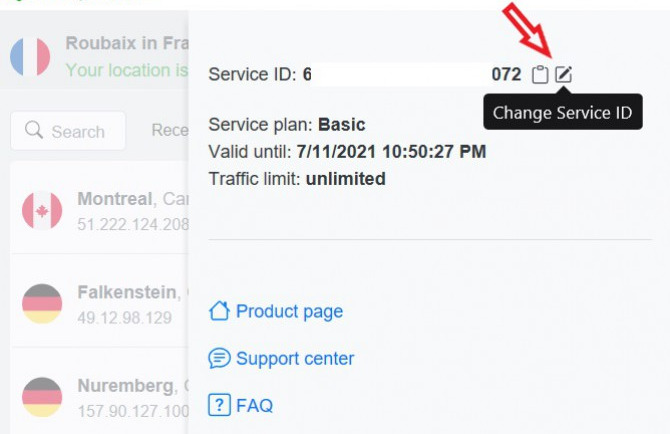
3. Enter your new Service ID
Keep the SID format as XXXXX-XXXXX-XXXXX-XXXXX (don't skip the "-" characters)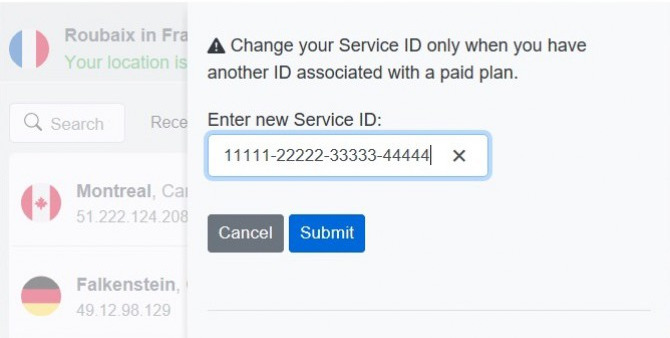
Note that the change is allowed only for the new Service ID attached to a commercial plan (Basic or Premium).
4. Submit the change
The application should immediately start using the new Service.
If your new SID happen to fail the verification, check its correctness (value and format of XXXXX-XXXXX-XXXXX-XXXXX) - preferably use copy-pasting.
In case of any issues, feel free to contact us.